
/api/v1/create/checkoutCreate Checkout
Endpoints for creating hosted checkout pages for customer payments. Merchants use these APIs to initiate payment requests and generate secure Beqelal-hosted checkout URLs. Customers are redirected to these pages to complete payments via their financial institution.
Authentication
Requires the following headers:
app-id: Your application identifier (from Account Management → Generate API Key → APP id)api-key: Your secret API key (from Account Management → Generate API Key → API Keys)Request Processing
1. Validation:
- Verifies required fields (phone, amount, return_url)
- Validates Credentials
- Validates account status and balances
2. Payment Session Creation:
- Generates a unique payment reference
- Creates secure checkout URL
- Records transaction metadata
Parameters
Mandatory Fields
phonestringRequiredCustomer's phone number in international format (e.g., 251912345678)
amountnumberRequiredTransaction amount in ETB (Ethiopian Birr). Must be greater than 0.
trace_numberstringRequiredUnique merchant reference for tracking. Must be globally unique.
return_urlstring (url)RequiredURL where the customer will be redirected after completing the payment
Optional Fields
callback_urlstring (url)OptionalOverride the portal-configured webhook URL for this specific transaction
Response
Returns JSON containing:
- Payment reference ID
- Checkout URL for customer redirection
- Initial transaction status
Payment Flow
- Customer completes payment via the provided
checkout_url - System redirects to
return_urlafter completion - Payment result is sent to
callback_urlvia Webhook (see Webhook Callback Format below)
Important Notes
- Trace Numbers: Must be globally unique
- Expiration: Checkout links expire after 10 minutes
- Currency: All amounts in ETB unless specified otherwise
Webhook Configuration
Mandatory:
Configure your webhook URL and secret in the Merchant Portal (Integration → Webhooks)
Override:
Optionally provide callback_url in the request to override the portal-configured webhook URL for this transaction
If callback_url is not provided, the portal-configured webhook URL will be used
Error Handling
Returns 400 status code for:
- Missing required fields
- Invalid account status
- Insufficient balances
Duplicate Trace Number (439)
{
  "error": {
    "status": "FAILED",
    "status_code": "439",
    "message": "TRACE_NUMBER",
    "detail": "trace_number must be unique"
  }
}
Code Examples
curl -X POST "{base_url}/api/v1/create/checkout" \
  -H "Content-Type: application/json" \
  -H "app-id: YOUR_APP_ID" \
  -H "api-key: YOUR_API_KEY" \
  -d '{
  "phone": "251911000000",
  "amount": 100,
  "trace_number": "70RNVP0548",
  "return_url": "https://www.example.et/v1/",
  "callback_url": "https://www.example.et/v1/"
}'
Response Examples
Success (200)
200 - OK{
"id": "4EA110DX7X",
"phone": "251911000000",
"amount": 100,
"trace_number": "QREPDKFHDF4EA110DX7X",
"status": "PROCESSED",
"status_code": 200,
"checkout": "https://checkout.beqelal.net/#/checkout/payment/425429a3-94ee-4554-98b3-bf663f6d99c2"
}Bad Request (400)
400 - Bad Requeste.g., duplicate trace number, missing/invalid fields
{
  "error": {
    "status": "FAILED",
    "status_code": "439",
    "message": "TRACE_NUMBER",
    "detail": "trace_number must be unique"
  }
}
Unauthorized IP Access (479)
479 - Unauthorized IPRequest from IP not whitelisted in Merchant Portal
{
  "error": {
    "status": "FAILED",
    "status_code": "479",
    "message": "UNAUTHORIZED_IP_ACCESS",
    "detail": "Unauthorized IP address access."
  }
}
Redirect User to Checkout Link
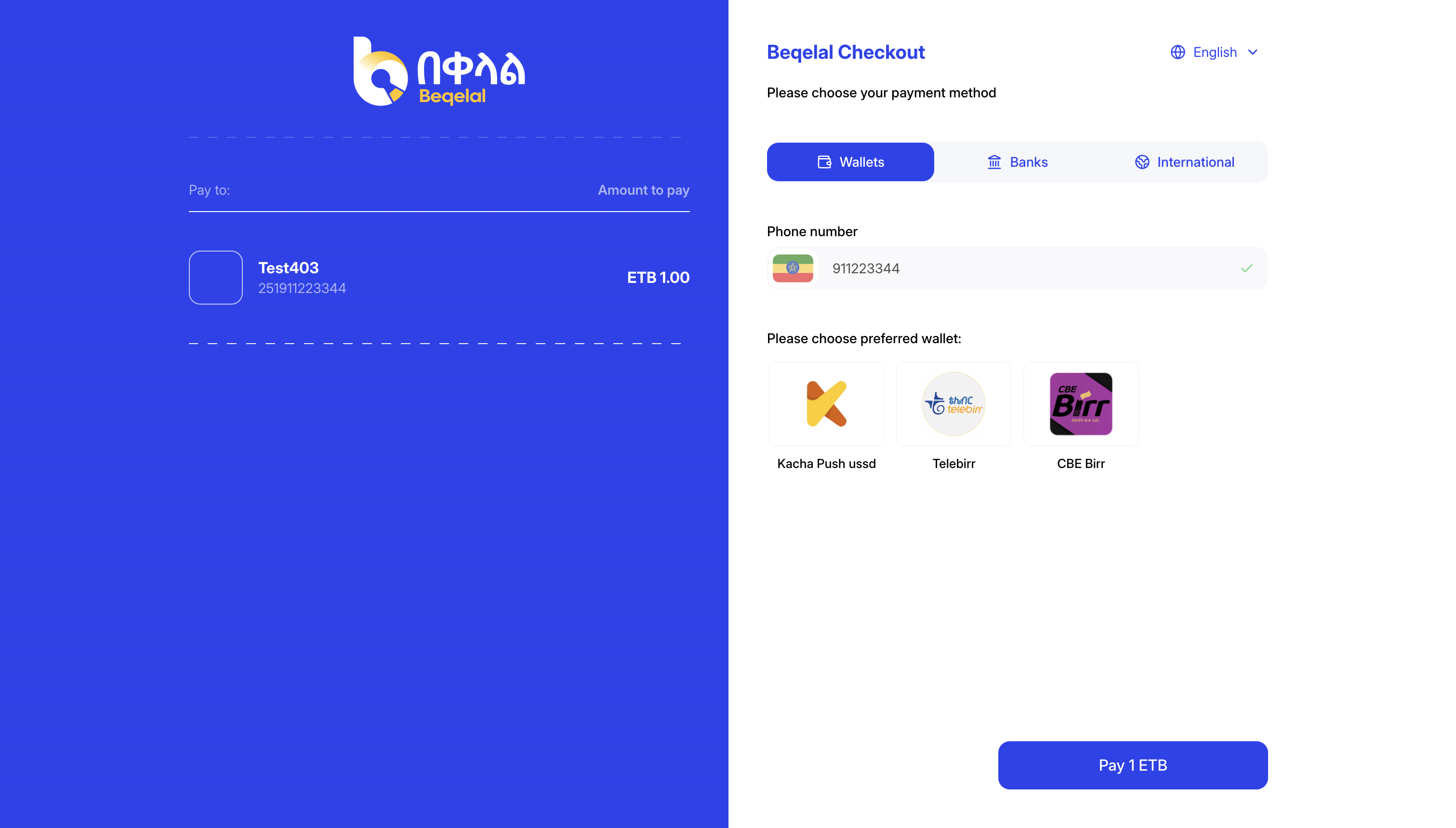
After Payment
These things will happen when payment is done successful
- We'll redirect to your set
return_url - We'll send a
POSTrequest to your configured webhook URL.
Webhook Notification
After payment processing, Beqelal will send a POST request to your configured webhook URL (portal setting or callback_url override) with the following format:
HTTP Headers
Content-Type: application/json
User-Agent: Beqelal-Webhook/1.0
X-Webhook-Signature: <HMAC_SHA256_SIGNATURE> (if webhook secret configured)
X-Webhook-Timestamp: <UNIX_TIMESTAMP> (if webhook secret configured)
Request Body
{
  "reference": "BEQELAL_REF_123",
  "trace_number": "MERCHANT_REF_456",
  "status": "PROCESSED",
  "amount": 100.0,
  "timestamp": 1695123456
}
Fields:
reference: Beqelal's unique transaction IDtrace_number: Your original merchant referencestatus: Either "PROCESSED" (success) or "FAILED" (failure)amount: Transaction amounttimestamp: Unix timestamp when the webhook was sentSignature Verification:
If you have configured a webhook secret, verify the X-Webhook-Signature header using HMAC SHA256. See the webhook test endpoint documentation for details.
Retry Logic:
Beqelal will automatically retry failed webhook deliveries up to 3 times with a 1-second delay between attempts.